A part of the learning outcomes for this trimester of Studio 3 is being able to create a network game and play it with other people.
The primary thing that was different for me in terms of programming is how detail oriented network programming is. You’re dealing with data bits and bytes at a time, and always have to manage how much data your sending and why.
To get the game started, we sat down and designed the game. We ended up designing a simple topdown 2d shooter.
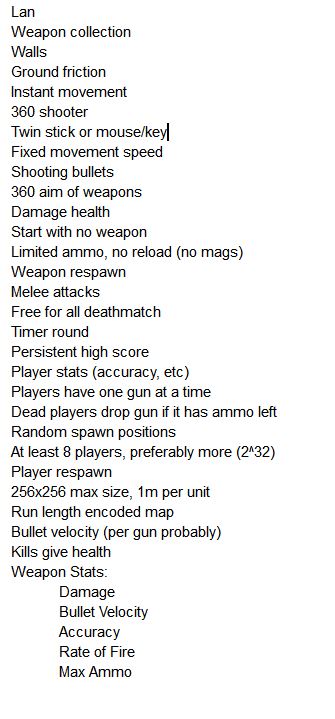
With the design out of the way, we needed to make a server. Greg would be the one to make the server, and we would be the ones to talk to the server so we could play the game. However, due to time constraints, the server didn’t get completed and only these functions were implemented
- Receiving a client announce packet
- Sending map data to client
- sending your own players start position
- receiving player movement (but NOT sending player movement)
- Creating and destroying bullets
Starting with the map data, we needed to set up unity to send data to the server. I chose to use Unity for this project for a few reasons, the main reason being that I am most familiar with Unity and C#.
So, I set about creating the networking infrastructure on Unity. Thankfully, unity comes with a library to create sockets to send data.
Socket sending_socket; //the socket that will be sending our packet
IPAddress send_to_address;//the IP adress to send toIPEndPoint sending_end_point;//the end destination socket
EndPoint listen_end_point;//the socket to get data back from
byte[] receive_byte_array;//the data we will be receiving
With the variables set up, we need to announce ourselves to the server.
void Announce()
{
sending_socket = new Socket(AddressFamily.InterNetwork, SocketType.Dgram, ProtocolType.Udp);//create the socket
send_to_address = IPAddress.Parse(“192.168.1.100”);//the IP of the serversending_end_point = new IPEndPoint(send_to_address, 1300);//where to send the data and at what port
listen_end_point = new IPEndPoint(IPAddress.Any, 0);//we’ll receive data from any source
receive_byte_array = new byte[100000];//make the array large enough to fit anything that might be sentClientAnnounce ca = new ClientAnnounce(); //create a new packet class
ca.type = (int)Packet.PacketType.PT_ClientAnnounce;//describe the type of packet
ca.name = “Caleb”;//give the data, in this case my namesending_socket.SendTo(ca.ToBytes(), sending_end_point);//then send the announce to the server
}
While that looks relatively simple, there’s a lot going on there. The server and the client need to be able to see what kind of packet they are receiving and sending. In this case, the type of packet is a client announce packet. When the server receives the packet, and queries what kind of data it is, it can then run the particular function that will handle adding a new player to the server.
Then, there’s the ToBytes() function in the sending socket. As I said before, we’re dealing with bytes of data at a time, and we can’t send an entire class over the network, there’s way too much information associated with a class. So we break down the data into what we need.
In the Client Announce packet class, we put in the ToBytes function to do just that.
public byte[] ToBytes()
{
List<byte> buffer = new List<byte>();//new listbuffer.Add(type);//add the type of the packet. As its a single byte already, we can just add it
byte[] b = Encoding.ASCII.GetBytes(name); //next we parse the string into an array of bytes
buffer.AddRange(b); //then add all the bytes into the list//Debug.Log(buffer.Count);
return buffer.ToArray();//then send off the data
}
On the servers end, it can just read in the data a byte at a time to do what’s necessary with it.
Now that the server has received my announce, and created my player, it’s going to send me the server information. This includes:
- The map data (a 32×32 map)
- if its a wall or a floor
- Run length encoded
- Your Player position
- including the ID for your player
Now the server is sending me the map in a RLE , a Run Length Encoding. It’s a simple form of compression where if the data being sent is being repeated, it can shorten the data. In the case of the map, the data looks something like this:
33 1 30 0 2 1 30 0
What we’re seeing here is the number of bytes being repeated. The first two numbers, 33 and 1, mean that there is 33 repeated instances of the number 1. As the map only consists of walls and floors, we can just use a 1 or 0 to make a wall or floor. In this case, it makes 33 walls (one will wrap around to the next floor) and then make 30 instances of a floor.
This means instead of sending a 1024 byte packet (32×32 tiles) we can shrink that down.
Now we just have to parse that data.
So the server has received my client data, and is now madly trying to send me the server information. I just have to listen for the packets coming in, and determine which one is the server data.
while (sending_socket.Poll(0, SelectMode.SelectRead))
{
int result = sending_socket.ReceiveFrom(receive_byte_array, ref listen_end_point);byte[] resultsBytes = new byte[result];
Array.Copy(receive_byte_array, 0, resultsBytes, 0, resultsBytes.Length);
This code will run on every frame, and will take queued up packets and parse them into the result bytes array. However, we still need to get the bytes of data from the array. Thankfully, Greg has supplied us with a solution to that. He has created a Memblock class that allows us to read the bytes inside of the data block.
MemBlock mb = new MemBlock(resultsBytes);
int type = mb.getU8();
So we create a new memblock our of the chunk of data we have, and then we get the first unsigned 8bit piece of data inside. In this case, its the type of data, so we can check it against our own enum to see if its the one we want.
if (type == (int)Packet.PacketType.PT_ServerInfo)
So now we have received the server info, we can start parsing it. This is a simple matter of checking if each block is a wall, and instantiating the relevant prefab to that location.
_mb.seek(5);//go to the 5th byte (bypassing the type and the ID
//width and hieght
_serv.width = ((int)_mb.getU8()) + 1;//+1 to the number because the map can’t be 0,0 size
_serv.height = ((int)_mb.getU8()) + 1;int[] map = new int[_serv.width * _serv.height];//get an array of ints for each tile
Then we get the size of the RLE and then we parse the data
int buffer = _mb.current();//how far the mb is already, so we can stop when necessary
while (_mb.current() < _serv.RLEsize + buffer)
{
int RLEcount = _mb.getU8();
int tile = _mb.getU8();for (int index = 0; index < RLEcount; ++index)
{
map[count] = tile;if (count < map.Length – 1)
++count;
}
}SpawnMap(map, _serv);
This goes through the created array, and tells each element if they are a 1 or a 0. We then simply go through the the array and create the map
for (int index = 0; index < _map.Length; ++index)
{
GameObject toSpawn;if (_map[index] == 0)
{
toSpawn = floor;
}else
{
toSpawn = wall;
}Vector2 pos = new Vector2();
pos.x = (index / _serv.width) + .5f;
pos.y = (index % _serv.height) + .5f;pos.y = -pos.y;//flip it because 0,0 is top left, not bottom left
Instantiate(toSpawn, pos, Quaternion.identity, mapParent.transform);
}

Then we simply create an instance of the player, and spawn us at the given location.
void SpawnPlayer(MemBlock _mb)
{
GameObject instance = Instantiate(playerPrefab, Vector3.zero, Quaternion.identity);MyPlayerData pd = instance.GetComponent<MyPlayerData>();
pd.ID = _mb.getS32();
pd.pos.x = _mb.getFloat();
pd.pos.y = -_mb.getFloat();//negative because top right againinstance.transform.position = pd.pos;
currPlayer = pd;
}
Now that we’ve use the information we got from the server, we stop accepting packets of this particular type, and send a confirmation packet so the server stops sending.
ClientInfoAcknowledge cia = new ClientInfoAcknowledge();
cia.type = (byte)Packet.PacketType.PT_ClientInfoAck;
cia.ID = servinf.ID;sending_socket.SendTo(cia.ToBytes(), sending_end_point);//send back confirmation
waitingForInfoAck = true;//as the packets queue up, we don’t need to run this again until
All the Acknowledge needs to send is the ID that the server sent in the initial packet, and the type of packet.
Next we can create and destroy bullets. This is fairly simple, as all we need to do is instantiate the bullet, its start location, and its velocity, and then we leave it alone until the server tells us to destroy it
if (type == (int)Packet.PacketType.PT_ServerNewBullets)
{
ServerNewBullets snb = new ServerNewBullets();snb.bulletCount = mb.getU32();//the number of bullets the server wants to make
for (int index = 0; index < snb.bulletCount; ++index)
{
GameObject instance = Instantiate(bulletPrefab, Vector3.zero, Quaternion.identity);//create the bulletBullet bulletData = instance.GetComponent<Bullet>();//access the script
//give the data
bulletData.bulletID = mb.getU32();
bulletData.pos.x = mb.getFloat();
bulletData.pos.y = mb.getFloat();
bulletData.vel.x = mb.getFloat();
bulletData.vel.y = mb.getFloat();
bulletData.radius = mb.getFloat();
bulletData.weaponType = mb.getU8();bulletData.ApplyData();//apply the data
bullets.Add(bulletData);//add it to a list to delete
}
}
Then deleting it is the same process. We just need to find the bullet by its ID and we delete it from the list.
if (type == (int)Packet.PacketType.PT_ServerRemoveBullets)
{
ServerRemoveBullets srb = new ServerRemoveBullets();srb.bulletCount = mb.getU32();
for (int index = 0; index < srb.bulletCount; ++index)
{
uint id = mb.getU32();for (int index2 = bullets.Count – 1; index2 >= 0; –index2)//reverse index in case the list gets messes from deletion
{
if (bullets[index2].bulletID == id)
{
Destroy(bullets[index2].gameObject);
bullets.RemoveAt(index2);
break;
}
}
}
}
Now the final functionality of the server is sending our own information to the server. As the player we can do the following:
- Send our velocity (not our postion)
- If we’re shooting
- Our rotation
The velocity we send is normalised on the server end, so we only need to send the directions we’re moving.
So we need to send this data frequently, but sending it on every frame is overkill, and may cause lag on the server. We can used fixedUpdate to send every third of a second for optimal performance while keeping the data consistent.
void ClientToServer()
{
ClientUpdate cu = new ClientUpdate();cu.type = (byte)Packet.PacketType.PT_ClientUpdate;
cu.rotation = currPlayer.rotation;//the rotation in degrees (converted from Atan2)
cu.isFiring = currPlayer.isShooting;//is firing as a byte (1 or 0)
cu.vel = currPlayer.velocity;//velocity uses the directions as velocity.sending_socket.SendTo(cu.ToBytes(), sending_end_point);
}
This would move the player, send its rotation, and whether or not it was shooting to the server. This meant that we could “play” the game, if we all used the servers visualization. However, as the server didn’t have the capability to send any of this data back to the client, it was limited in terms of client side interaction.
 Caleb Barton | Games Programmer