So now we have all the data we need to make the game systems. The first thing I needed to do was to make a method for passing the data over to the next scene. The data manager we’re using is a singleton, so that data is always accessible, however we need to get a specific Exercise and Activity to load the correct question.
To solve this, I had a script attached to the button that loads the scene. This button has the areaID (the skill) and the exercise ID, and when pressed, the manager controlling scene swapping stores this data. Then, when the scene is loaded, the 3QManager (named because it can do three kinds of questions) asks the scenemanager what data it should search for, and queries the DataManager.
public Exercise SearchForData(string _areaID, string _exerciseID)
{
foreach (Area areas in xml.areas)//search areas
{
if (areas.areaID == _areaID)
{
foreach (Exercise ex in areas.exercises)//search exercises
{
if (ex.exerciseID == _exerciseID)
{
return ex;//we’ve found the correct exercise
}
}
}
}
return null;
}
The manager now knows all the activities and questions it has, but now it has to figure out what activity its in (MC or AIO) and what questions to spawn from that.
When the manager is asked to provide a question to load, it checks what activities are available and loads the correct one
public void CheckActivityState()
{
if (currActivity.activityID == “MA”)
currState = gameState.e_MultipleAnswer;if (currActivity.activityID == “MC”)
currState = gameState.e_MultipleChoice;if (currActivity.activityID == “AIO”)
currState = gameState.e_AnswerInOrder;
}
It then grabs a copy of the list of questions held by that activity type.
questions = CopyQuestion(currActivity.questions);
This does a “deep” copy (manually creating a new element and copying data over) because we’ll be deleting elements from the question list, and we don’t’ want to modify that directly.
It’ll then remove a random question from the list, shuffle the answers within the question, and then ask the DisplayManager to create the elements for the question.
So now we do some tricky shit. Because the “Answer in Order” activity uses a drag and drop system to put the words in the correct order. This way, you can construct a sentence with words, or fill in the gaps in a sentence.
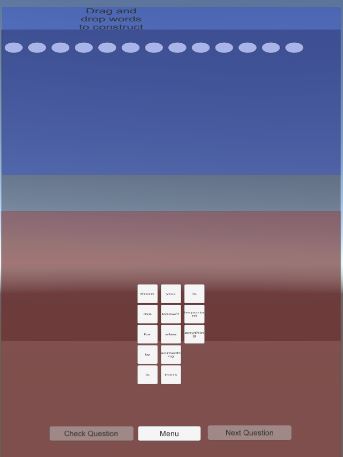
So what I decided to do to create the “nodes” that the words would need to slot into, I devised a system that would create a node when it encountered a specific symbol (in this case the @ symbol). If it didn’t encounter the symbol, it would use the text to create part of the sentence.
if (words[index] == ‘@’)
component.enumState = nodeText.nodeState.e_IsEmpty;
else
component.txtValue = words[index];
component.enumState = nodeText.nodeState.e_IsText;
This method of instantiating text was very haphazard, and looked like trash. However, it was purely data driven and didn’t care what it was given, meaning it was easy to program and display. And in the words of the designers, “Do nothing with the UI, just get it working”. THIS WAS AN OMEN OF ILL THINGS TO COME (spoiler).
The reason why this wasn’t the best decision for the development of the project? Because the designers could not work with this system in any way at all.
Because everything was purely data driven from the XML sheet (everything meaning the main menu buttons, the activities, and the questions), it also meant that the designers couldn’t make a functioning UI system that didn’t look like trash. This meant we had to refactor how the entire system worked to accommodate the designers (this was a good thing, don’t worry)
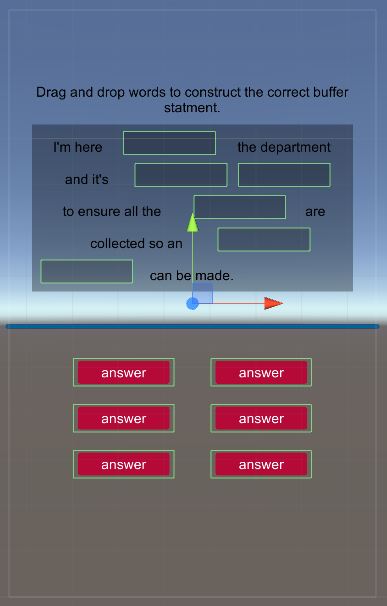
However, this refactoring ended up being much easier than expected. To make the change, I asked the designers to make a prefab for each question, laying out everything in the right place so it looked designer pretty instead of programmer pretty. I then set up a system in the datamanager that stored these prefabs and loaded them when needed.
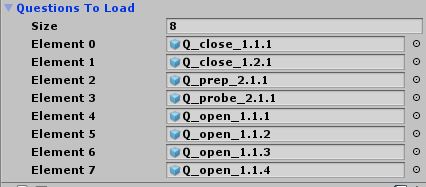
So now instead of parsing the individual text elements into sentence and answers, it just loads in the entire prefab, and then uses the tag system to fill in the data into the correct spots.
GameObject qPrefab = DataManager.instance.FindQuestion(managerInstance.currQuestion.questionID);
…
if (currChild.CompareTag(“QuestionText”))
{
//The text of the question
Text txt = currChild.GetComponent();
txt.text = managerInstance.currActivity.activityText;
}
else if (currChild.CompareTag(“AnswerButton”))
{
answerButtons.Add(currChild.gameObject);
}
Then populating the list of answer buttons with their respective data
Question tempQ = managerInstance.currQuestion;
for (int index = 0; index < answerButtons.Count; ++index)
{
buttonData temp = answerButtons[index].GetComponent();temp.isCorrect = tempQ.answers[index].isCorrect;
temp.correctSlots = tempQ.answers[index].correctSlots;
temp.answerID = tempQ.answers[index].answerID;
temp.answerText = tempQ.answers[index].answerText;
}
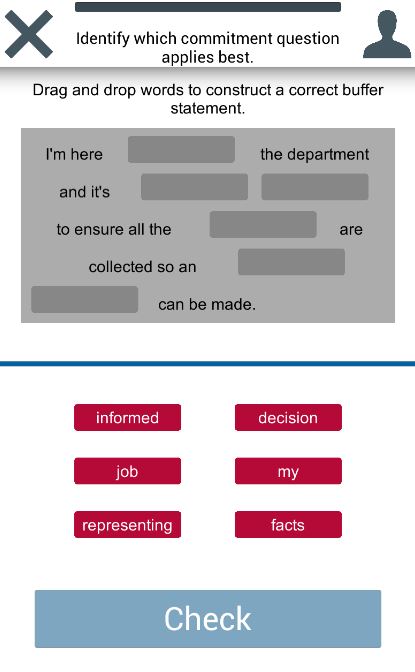
This balance of “human made” and data driven design means that the content of the questions that the users would be interacting with would be up to date, accurate, and look good.
Concluding now. While this wasn’t as in depth in technical terms as my previous posts, I’ll be going into depth about how working in a serious software development was different from games, and how those differences affected the project in the post mortem I’ll be posting soon.
 Caleb Barton | Games Programmer
One thought on “Studio 3: A Journey through Serious App Development (part 3)”