Hello friends of Facebook, didn’t realise WordPress was posting here as well, but I suppose I’ll let you creeps keep reading my blog.
The PROSPECT model is a methodology of getting information from people. It’s an acronym that stands for:
- Preparation
- Rapport (building rapport)
- Opening the Interview
- Solicit a Version
- Probe the Version (getting details)
- Evaluate the Version (compare details to other information)
- Close the Interview
- Transition (the post interview process)
The PROSPECT model is simply a structure that you can follow to get the most out of your interviews.
Our studio group decided that basing our app off the PROSPECT model would work best, as they are already defined categories. As we’re not supposed to be making a teaching tool, but a practising tool, we didn’t need to worry about teaching the nitty gritty theory of interviewing techniques, just reinforcing them. So using PROSPECT as the base, the designers would create activities that would allow users to practice individual skills.
Now our job as programmers was to make a system that would accommodate what the designers would want to create based off the client specifications:
- Android/IOS based (PC secondary)
- Included content delivered in the training seminar
After a week or so the designers ended up with a game that allowed users to practice the PROSPECT model. A large chunk of this game was a series of multiple choice questions, and an “answer in order” question.
Our first thought was that the game could have hand crafted scenes, where everything had to be created. However, we realised that this would really limit the size the project could be, and so we started thinking about scalability for the project.
We wanted the designers to be able to create and implement series of questions easily, while being able to change the data. Greg, our programming lecturer suggested we utilise an XML data storage for the questions and answers that the designers would be creating. We could then parse that data into the game and dynamically create a game based on the provided data. This would allow us to remotely add and remove data without updating the entire app, just the data sheet.
The XML sheet would end up looking something like this:
<area type=”Close”> //the specific skill being practised
<exercise id=”Q_close_1″ text=”Exercise2″>// each skill type can have different exercises
<activity type=”AIO” text=”Activity1″>//the type of question (Multiple answer, answer in order)
<question id=”Q_close_1.1.1″ text=”Question1″>//a question that can belong to this activity
<answer id=”1″ text=”is” slot=”1,7″/>//one of the answers for that question
So while this is a fair amount of data, the designers only needed to make a CSV sheet of the questions and answers so that we could convert that into an XML sheet and parse the data.
Marv was in charge of grabbing the xml data and making the relevant classes for them. Once the data was parsed by him, the data looked like this in unity.
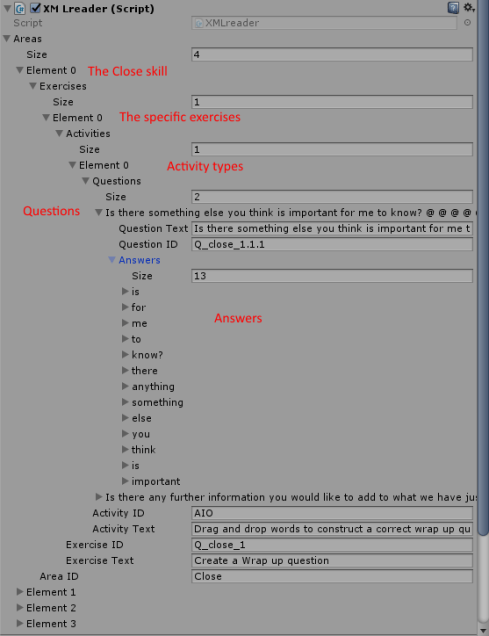
As you can see, this is a lot of data. However we still needed to use the data to make the game. I was responsible for creating the systems that took the stored data and made it into a game.
How did I do it?
FIND OUT NEXT TIME ON DRAGON BALL Z
 Caleb Barton | Games Programmer
2 thoughts on “Studio 3: A Journey through Serious App Development (part 2)”