During Slot Charmer I created most of the systems that made the game what it is. Here’s the scripts and their fucntions that I’ve made.
GameManger
The GameManager in Slot Machine was intended to govern the state of money and fondness, the current state of the game (playing, waiting for bet, lost etc.) so that all scripts could refer to this manager. As a result, I made a singleton of the GameManger class so that scripts could easily access its data, and to ensure there was only ever one instance of it at any one time, due to the fact it hold the entirety of the game state.
UpdateMoney() & UpdateFondness()
The GameManager changed its data using these functions, so that the data being passed to the game manager was done in a way that can be debugged easily, and so that other game states can be changed from their respective functions. The UpdateMoney function checks each time money has changed to see if the player has won or lost. Both these funtions then tell the UI to update with the changed variables. This workflow should be faster than having the UI constantly checking the GameManagers values.
EndGameCount()
The Game Manager also keeps track of each ball in the games play. Each ball is checking if its able to be picked up, whether its in play, and when its finished play. When the ball has finished play, it sends a message to the game manager that it’s done, and it also tells the symbol checker what symbol it hit. When all three balls have sounded off, the game then checks if there is a combo by asking the symbol checker to return a bool. If it won, then it increases win count and resets the loss count and vice versa. It then enables the button to start play again. In addition, this function also checks if the player has lost two games in a row, which if they have, they lose fondness for every two games lost.
UI Controller
Having not used much of Unity’s UI since before the 4.6 update, I was pleased to find how easy it was to create and implement UI features such as buttons. I decided to create a separate scene and additively load it in so that the primary game scene wouldn’t become cluttered with the canvas and the related objects.
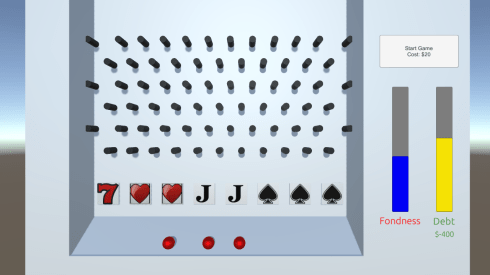
In addition I made the script handling the UI a singleton so that the gamemanager could easily access the UI and tell it to change as needed. Primarily updating the sliders seen in the screenshot and their related colours. The sliders have their min and max value set in the inspector, then when the corresponding value changes in the gamemanager (such as gaining money), the game manager will update the UpdateMoney function.
Ball
The balls behaviour was relatively simple as described in the gamemanager section. What is didn’t say is how the ball moves relative to the mouse position.
void OnMouseDown()
{//this takes the balls position and puts it relative to the screen instead of world space
screenPoint = Camera.main.WorldToScreenPoint(gameObject.transform.position);//this then offsets the position of the gameobject and the mouse position.
offset = gameObject.transform.position – Camera.main.ScreenToWorldPoint(new Vector3(Input.mousePosition.x, Input.mousePosition.y, screenPoint.z));
}void OnMouseDrag()
{
if (canPickUp)
{
rb.useGravity = false;//disable gravity while dragging//this updates mouse position
Vector3 curScreenPoint = new Vector3(Input.mousePosition.x, Input.mousePosition.y, screenPoint.z);//this changes the position in world space as to where the ball should go
Vector3 curPosition = Camera.main.ScreenToWorldPoint(curScreenPoint) + offset;//offset mouse pos in world space//this then moves the ball to that position using its rigid body.
rb.MovePosition(curPosition);//move ball to location using physics. This will need to be expanded to prevent clipping
}
}
SymbolChecker
This script handles the behaviour of the different symbols shown in the screenshot. It randomises where each symbol will be each game, and it checks if there is a combo.
RandomiseSymbol()
The script has two lists: a list of the symbol game objects themselves, and a list of locations that the symbols can be at. When the function is called a copy of both these lists is created. It then works backwards through a for loop randomly assigning a symbol to a location, then removing both symbol and location from the copied lists until no elements remain.
AddTally() & CheckForCombo()
When a ball hits a symbol, it sends a message to the symbol letting it know which one was hit, and adds 1 to the relevant symbol variable. When the CheckForCombo is called, it simply checks if any of the symbol counts are equal to 3, and calls the relevant gamemanger increase function. CheckForCombo also checks if rewards for high fondness are given out as well. If the fondness is high, then the game randomly rolls two values: the change for double payout and the chance for easy combo. The game then checks for 2 symbols, and if the combo chance has been met, and can payout without having 3 total.
if (GameManager.GM.fondness > 7 && rand <= chanceForDouble)
moneyMult = 2;if (SymbolHeart == 2 && GameManager.GM.fondness > 7 && rand <= chanceForCombo)
{
GameManager.GM.UpdateFondness(3);
GameManager.GM.UpdateMoney(50 * moneyMult);
UIController.UIC.FadeText(“2 Hearts is good enough!”);
ClearTally();
return true;
}
Here you can see that both the chance for double pay AND easy combo are both possible.
MachineFondnessBehaviour
This section of script is pretty messy in my opinion. I believe that this script should have had total control of the different effects that could have happened based on fondness, but what ended up happening was that both symbolchecker and gamemanager did some of that while this did the rest.
CheckForChance()
This function is called every frame, and determines weather or not the symbols should re-roll their randomised position. This function is called when fondness is low. The function can only be called every 5 seconds, or whatever time is set in the inspector.
Shake()
A function that didn’t make it into the final game due to it being way to buggy.
public IEnumerator Shake(float amount, double _time)
{//save the position of the machine
Vector3 tf = origTransform;for (int index = 0; index < _time; ++index)
{//spaz about until the time is out
tf = Random.insideUnitSphere * amount;
transform.position = tf;
yield return new WaitForSeconds(0.01f);//added this here to prevent the movement being based on the FPS.
}transform.position = origTransform;
}
Although it worked to dislodge the balls as designed, it also had a tendancy to make the balls fall through the machine itself due to the nature of transforming the position, and fall into the nether. Efforts to use the rigidbody physics movement were even more spectacular in the failures, and the balls would catapult into the distance.
In the future if I was to attempts a similar function, what I’d do is have the camera itself shake, and tell the balls the nudge in a direction using their rigidbody, which would have the exact outcome of dislodging the balls, but without the fuckery.
 Caleb Barton | Games Programmer